
Table of contents
- 01What is A2UI?
- 02Why Text-Only AI Interfaces Are Becoming a Limitation
- 03What Makes A2UI Different?
- 04A2UI vs AI-Generated HTML
- 05A2UI vs MCP Apps: They Solve Different UI Problems
- 06The Building Blocks of an A2UI Application
- 07Why A2UI Is Interesting for AI SaaS Products
- 08How to Design an A2UI Component Catalog
- 09Building A2UI with React and Modern Web Applications
- 10When Should You Use Generative UI?
- 11When Should You NOT Use Generative UI?
- 12A2UI, MCP, A2A and AG-UI: How the Agentic UI Stack Fits Together
- 13Practical A2UI Development Roadmap
- 14How Much Does Generative UI Development Cost?
- 15Common A2UI and Generative UI Mistakes
- 16Will Generative UI Replace Traditional Frontend Development?
- 17The Future of AI Applications Is Bigger Than a Chat Box
- 18Frequently Asked Questions
- 19References
Why Text-Only AI Interfaces Are Becoming a Limitation
Chat interfaces are extremely effective for open-ended interaction. They are not the ideal interface for every task.
Consider asking an AI assistant to: Compare six subscription plans, Select several products, Schedule three appointments, Review a financial report, Edit structured customer information, Approve a proposed account change, Monitor ten active projects, Configure an automation workflow.
A text response can explain these things. But explanation is not always the same as interaction.
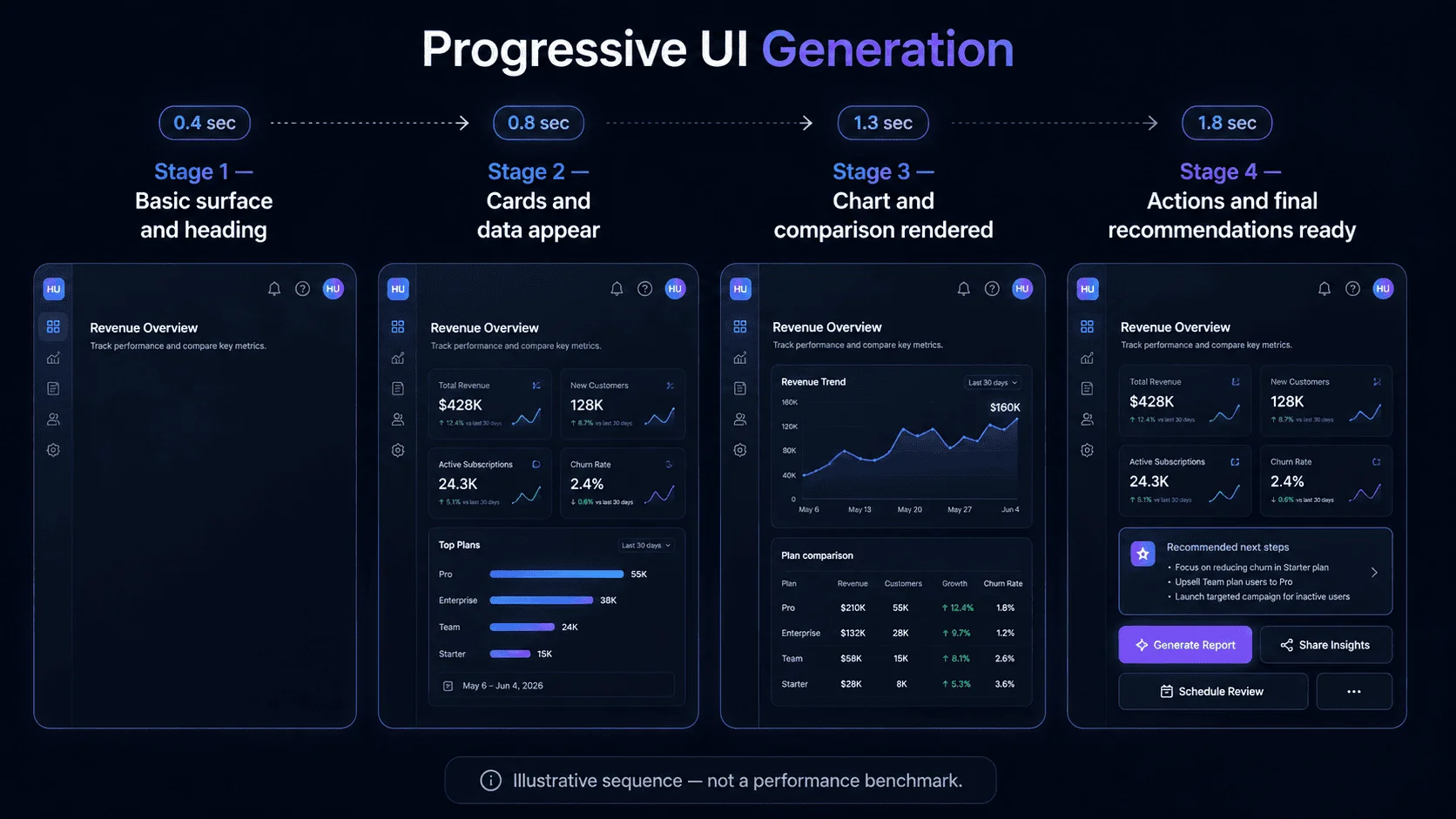
Imagine asking: “Which projects need my attention this week?” A normal AI response may produce a long list. A generative UI system could instead display a priority summary, three critical project cards, risk badges, due dates, expandable blockers, an owner selector, and approval buttons. The interface becomes part of the answer.
Text-Only AI vs Generative UI
Text-Only AI
User: “Compare my three highest-risk projects and help me decide what to do.”
- Long text output
- Manual comparison
- User must interpret options
- User must navigate elsewhere
Generative UI
Same AI reasoning. Better interaction model.
What Makes A2UI Different?
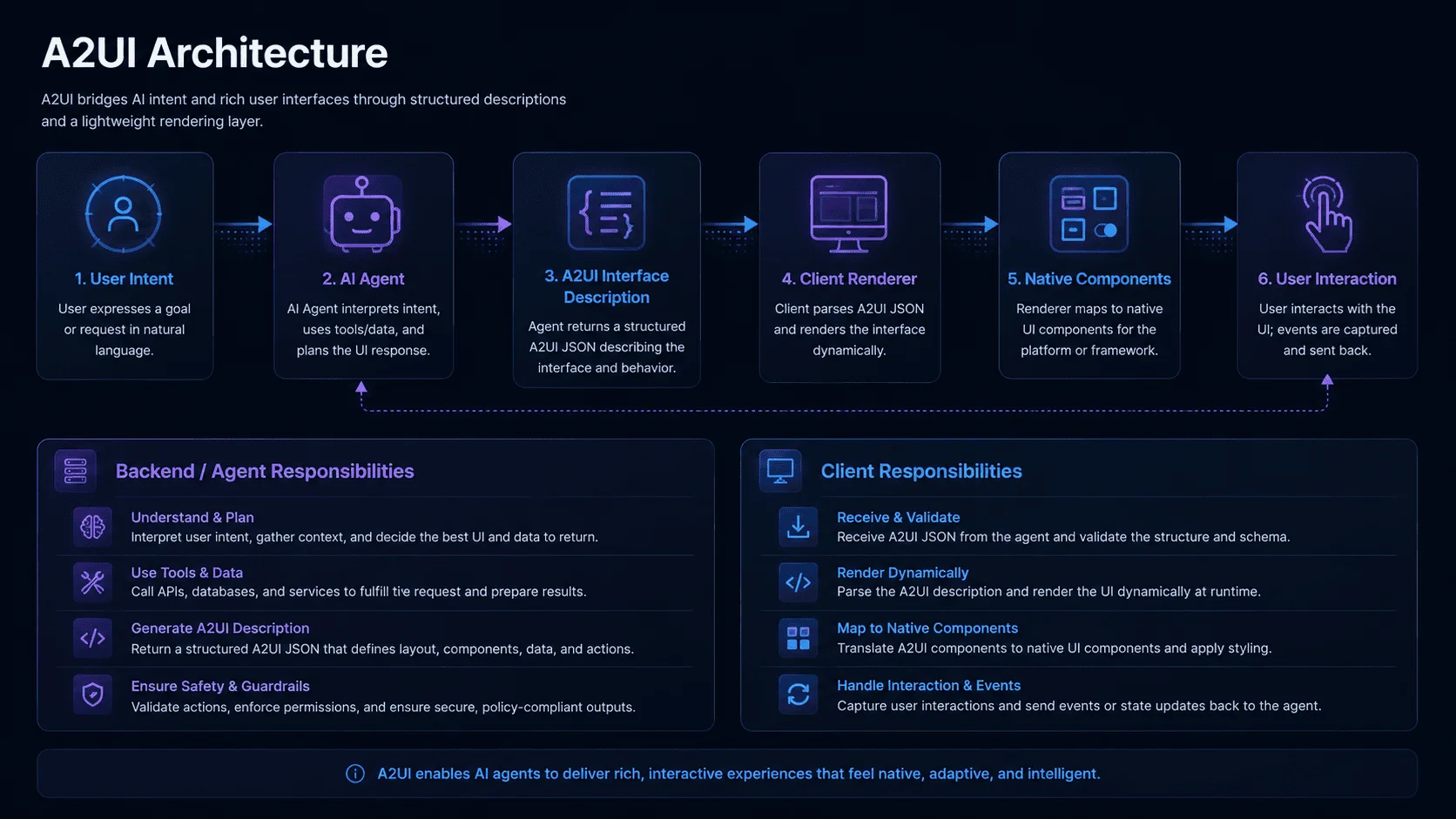
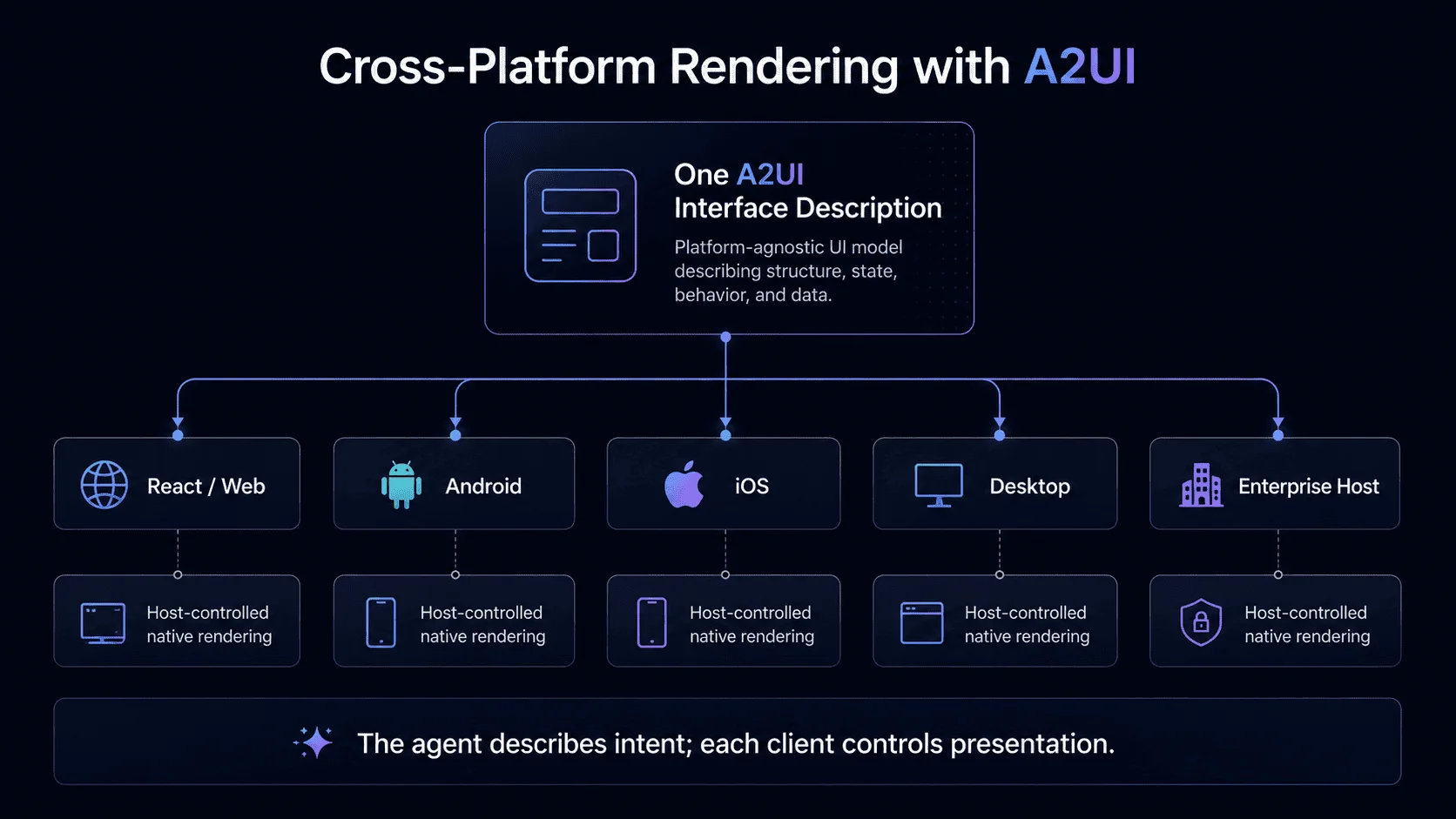
A2UI separates interface intent from interface implementation. The AI agent can describe what needs to appear, while the client determines exactly how that interface is rendered.
- 1Security: The agent is restricted to an approved catalog of components (Button, Card, Table, Chart, etc.). It cannot execute arbitrary scripts.
- 2Brand Consistency: The application decides what components look like. The AI controls composition, not your brand identity.
- 3Portability: The same conceptual response can be rendered using different client technologies (React, mobile, etc).
A2UI vs AI-Generated HTML
These two approaches should not be confused. AI-generated HTML (arbitrary code) can lead to script execution risks, inconsistent styling, and accessibility failures. A2UI uses declarative data where the application decides how it is safely rendered.
| Area | Generated HTML/JS | A2UI |
|---|---|---|
| Security model | Unrestricted code execution | Approved component sandbox |
| Brand consistency | Variable / Unpredictable | Guaranteed native tokens |
| Cross-platform use | Web only (usually) | Web, Mobile, Native |
| Component control | Model controls DOM | Host controls rendering |
| Runtime execution | Arbitrary scripts | Declarative mappings |
| Best fit | Developer tools | Production SaaS applications |
A2UI vs MCP Apps: They Solve Different UI Problems
The rise of remote MCP server for SaaS creating an interactive bridge. MCP Apps deliver rich interactive experiences in a sandbox, while A2UI sends declarative descriptions for native styling and consistency.
A2UI
Declarative UI description mapped to host native components.
- Native styling
- Declarative
- Host-controlled
MCP Apps
Interactive app resource rendered in a sandboxed embedded environment.
- Custom web UI
- Complex app behavior
- Embedded experience
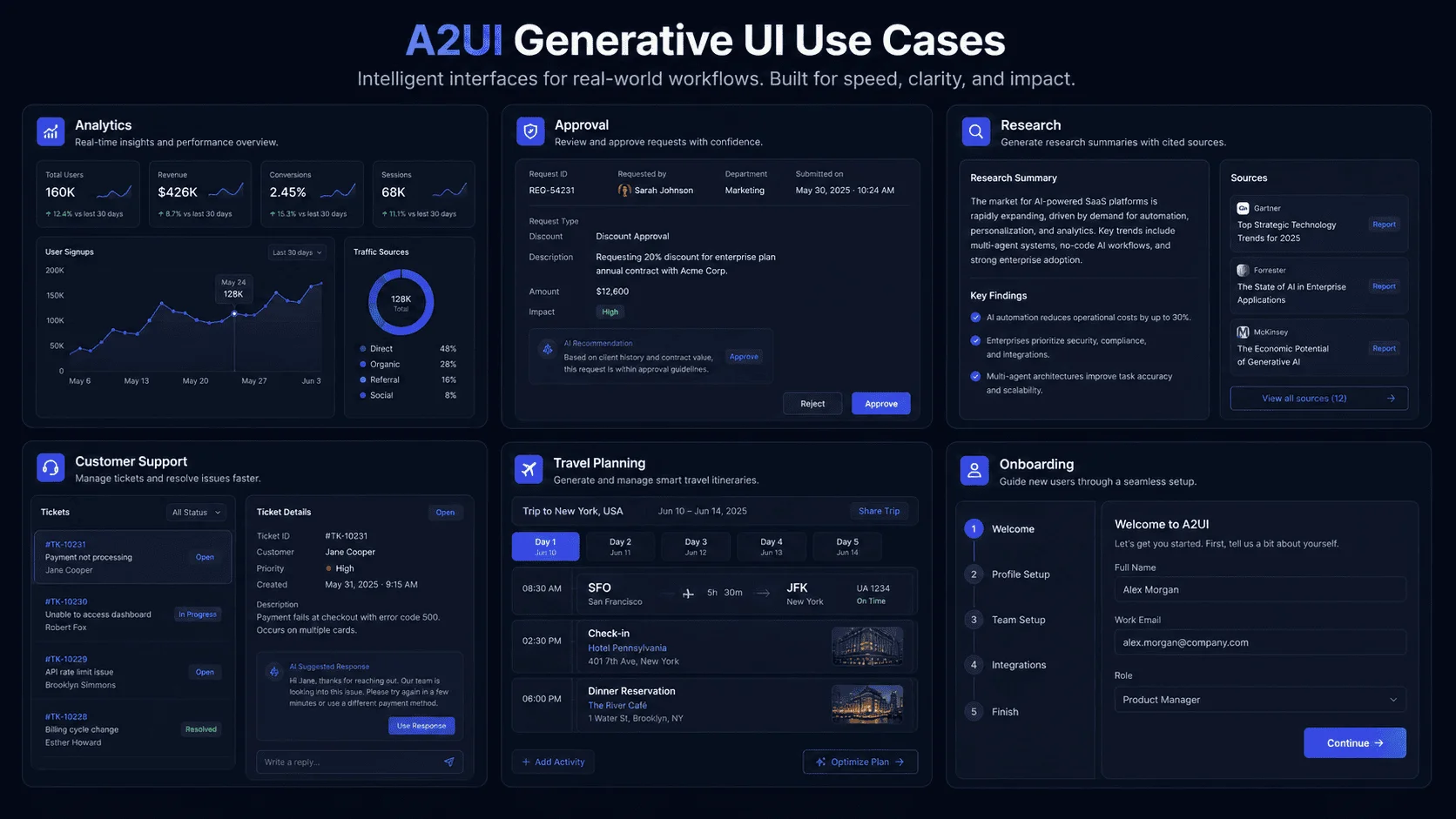
When Should You Use Generative UI?
Generative UI is particularly useful when the appropriate interface depends heavily on context. Good candidates include:
Data exploration
The structure of charts and comparisons changes according to the question.
Business approval
Different decisions require different evidence and controls.
AI research applications
Results may include combinations of sources, comparisons, timelines and follow-up options.
Customer support
Different problems may require troubleshooting checklists, account information, forms or escalation controls.
Travel and planning
The interface may need cards, maps, dates, pricing, selections, and itinerary controls.
AI onboarding
The agent can request only the fields required for the specific user or workflow.
Multi-agent applications
A specialized remote agent may return a structured UI that the host application can render using its own design language.
When Should You NOT Use Generative UI?
Generative UI should not replace every interface. Avoid unnecessary use for:
Core navigation
Primary product navigation should remain predictable.
Frequently repeated workflows
If every user completes exactly the same four-step checkout, a carefully designed fixed checkout may be better.
High-risk actions without review
A dynamic interface does not remove the need for authorization and approval.
Situations requiring pixel-perfect output
If exact layout is legally or operationally required, use controlled predefined interfaces.
Content that works perfectly as text
Do not generate a complicated card merely because generative UI is available. The best AI interface may sometimes be a single sentence.
Good Fit for Generative UI
- Context-dependent tasks
- Variable data structures
- Research/exploration
- Dynamic approvals
- Adaptive AI workflows
Keep the Interface Fixed
- Primary navigation
- Deterministic checkout
- Legally prescribed layout
- High-risk execution without approval
- Simple content that works as text
A2UI, MCP, A2A and AG-UI: How the Agentic UI Stack Fits Together
The growing protocol ecosystem can look confusing because these standards solve different problems.
MCP
How does an agent use tools and external resources? Primary role: Tool and context integration. See our guide on remote MCP server for SaaS.
A2A
How can independent agents communicate and delegate work? Primary role: Agent-to-agent interoperability.
AG-UI
How does an agent communicate state and events with the user-facing application? Primary role: Agent-to-frontend interaction and streaming.
A2UI
How can an agent describe the interface the user should see? Primary role: Declarative agent-generated UI.
MCP Apps
How can an MCP server deliver a richer interactive embedded application? Primary role: Interactive application experiences delivered through MCP.
These technologies can complement rather than replace one another.
The Building Blocks of an A2UI Application
A production A2UI implementation can be understood through six layers: User intent, AI Agent orchestration, Structured A2UI payload, Component catalog, Renderer, and Interaction/State management.
Why A2UI Is Interesting for AI SaaS Products
AI SaaS products often struggle between forcing everything into a chatbot or treating AI as a static feature. Generative UI creates a third model where contexts like CRM lead prioritization, analytics, and document review get task-specific native interfaces.
Learn more about how to build an AI SaaS product or explore AI workflow automation for business.
How to Design an A2UI Component Catalog
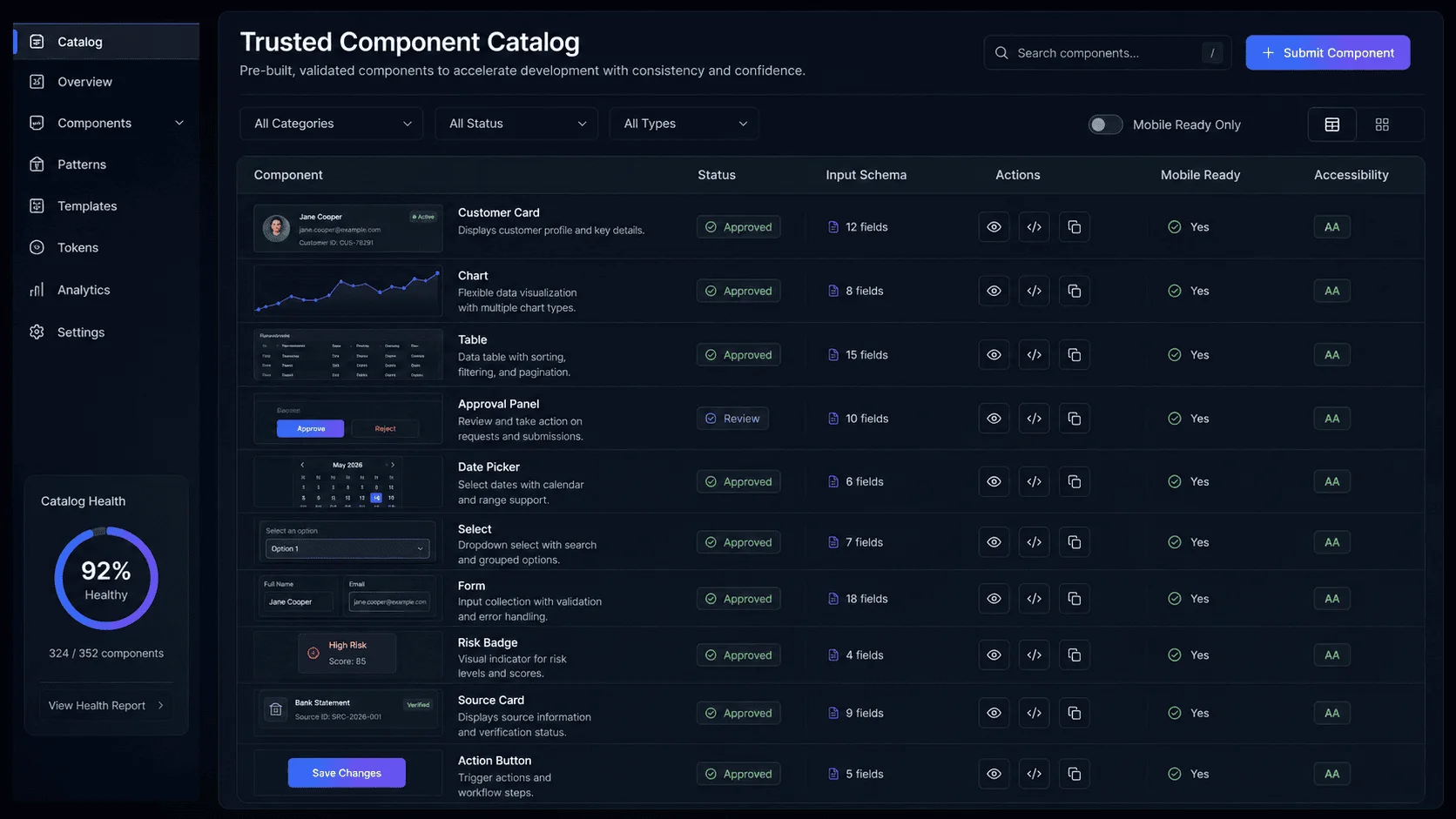
The component catalog is one of the most important parts of a generative UI implementation. It determines what the AI is actually allowed to render.
A poor implementation may expose dozens of low-level components with unclear behavior. A stronger implementation provides a carefully designed set of components that correspond to meaningful product interactions.
Begin with primitives
Useful foundations may include: Text, Heading, Row, Column, Card, Divider, Button, Input, Select, Checkbox, Date input, and List.
Add product-specific components
A business application can then expose higher-value components. For example: CustomerSummary, ProjectRiskCard, InvoiceReview, SupportTicket, SourceCitation, ApprovalPanel, MetricChart, and PricingComparison.
These components contain product logic and design standards that the AI does not need to recreate.
Prefer semantic components where useful
An agent deciding between Card + Text + Text + Button and CustomerFollowUpCard may produce more predictable results with the higher-level semantic component when the business workflow is well understood.
Keep the catalog controlled
Before exposing a component to the agent, define: Allowed properties, Required properties, Validation, Supported actions, Permission requirements, Accessibility behavior, Mobile behavior, Failure state, and Analytics events.
The catalog becomes an interface contract between the AI and the product.
Building A2UI with React and Modern Web Applications
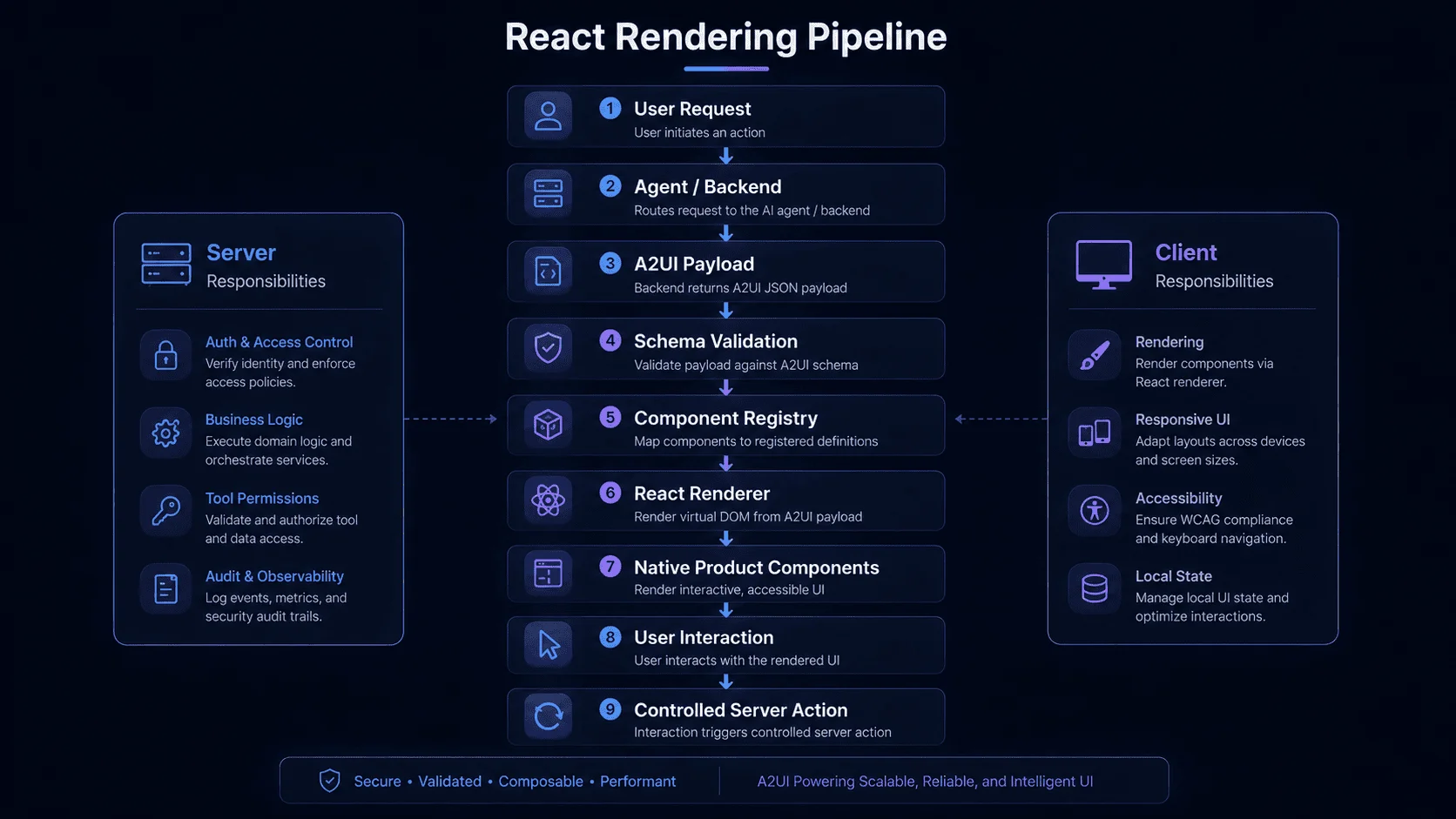
For a modern AI web application, the architectural goal should be separation. The agent should not directly manipulate the browser DOM.
Instead:
- 1The backend or agent produces the structured A2UI response.
- 2The application validates it.
- 3The renderer resolves requested component types.
- 4Approved React components render the interface.
- 5User interactions flow through controlled application functions.
A conceptual component registry could look like:
const componentCatalog = {
  CustomerCard,
  MetricChart,
  DataTable,
  ApprovalPanel,
  DatePicker,
  ActionButton,
}
When Should You Use Generative UI?
Generative UI is particularly useful when the appropriate interface depends heavily on context. Good candidates include:
Data exploration
The structure of charts and comparisons changes according to the question.
Business approval
Different decisions require different evidence and controls.
AI research applications
Results may include combinations of sources, comparisons, timelines and follow-up options.
Customer support
Different problems may require troubleshooting checklists, account information, forms or escalation controls.
Travel and planning
The interface may need cards, maps, dates, pricing, selections, and itinerary controls.
AI onboarding
The agent can request only the fields required for the specific user or workflow.
Multi-agent applications
A specialized remote agent may return a structured UI that the host application can render using its own design language.
When Should You NOT Use Generative UI?
Generative UI should not replace every interface. Avoid unnecessary use for:
Core navigation
Primary product navigation should remain predictable.
Frequently repeated workflows
If every user completes exactly the same four-step checkout, a carefully designed fixed checkout may be better.
High-risk actions without review
A dynamic interface does not remove the need for authorization and approval.
Situations requiring pixel-perfect output
If exact layout is legally or operationally required, use controlled predefined interfaces.
Content that works perfectly as text
Do not generate a complicated card merely because generative UI is available. The best AI interface may sometimes be a single sentence.
Good Fit for Generative UI
- Context-dependent tasks
- Variable data structures
- Research/exploration
- Dynamic approvals
- Adaptive AI workflows
Keep the Interface Fixed
- Primary navigation
- Deterministic checkout
- Legally prescribed layout
- High-risk execution without approval
- Simple content that works as text
A2UI, MCP, A2A and AG-UI: How the Agentic UI Stack Fits Together
The growing protocol ecosystem can look confusing because these standards solve different problems.
MCP
How does an agent use tools and external resources? Primary role: Tool and context integration. See our guide on remote MCP server for SaaS.
A2A
How can independent agents communicate and delegate work? Primary role: Agent-to-agent interoperability.
AG-UI
How does an agent communicate state and events with the user-facing application? Primary role: Agent-to-frontend interaction and streaming.
A2UI
How can an agent describe the interface the user should see? Primary role: Declarative agent-generated UI.
MCP Apps
How can an MCP server deliver a richer interactive embedded application? Primary role: Interactive application experiences delivered through MCP.
These technologies can complement rather than replace one another.
Agentic UI Stack Relationships
Declarative Interface
Embedded Apps
Frontend Events
Agent Collaboration
Tools & Context
Different protocols solve different boundaries. The stack allows the application to remain secure while providing high-utility AI experiences.
Practical A2UI Development Roadmap
Phase 1 — Select one generative workflow
Do not convert the complete application. Choose one context-dependent workflow where a generated interface creates obvious value.
Phase 2 — Define the component catalog
Identify the minimum approved components required.
Phase 3 — Build fixed examples
Create several manually authored A2UI responses before introducing generation. Verify: Rendering, Mobile layout, Events, Data binding, and Accessibility.
Phase 4 — Connect the AI agent
Allow the model to produce the supported structured interface format.
Phase 5 — Add validation
Validate every: Surface, Component, Property, Binding, and Action.
Phase 6 — Connect controlled backend functions
Never allow UI components to execute privileged operations directly.
Phase 7 — Build evaluations
Test whether the agent selects useful components, creates understandable layouts, preserves required information, avoids unsupported components, and requests appropriate actions.
Phase 8 — Test real users
Measure whether users complete the task faster and with fewer corrections than the previous interface.
Phase 9 — Expand carefully
Add new components and workflows only after evidence shows they are useful.
Development Roadmap
Choose Workflow
Select one high-value context
Define Catalog
Identify required components
Build Examples
Manual A2UI responses
Add Agent
Connect the AI model
Validate Output
Verify every property
Connect Actions
Secure backend functions
Evaluate
Measure agent accuracy
User Test
Measure completion speed
Expand
Add new workflows
Nine-stage A2UI development roadmap from workflow selection to controlled expansion
How Much Does Generative UI Development Cost?
There is no universal price because generative UI is normally part of a larger AI application. Cost depends on: Existing product maturity, Number of components, Number of generated workflows, Web versus mobile support, Backend integrations, AI orchestration, Authentication, Multi-tenancy, Security requirements, Evaluation, Custom design system, Protocol compatibility, and Deployment requirements.
Simple implementation
One AI workflow using a limited existing component catalog.
Intermediate implementation
Several generated interfaces connected to real SaaS data and user actions.
Advanced implementation
A multi-tenant product with: Several AI agents, Generative UI, MCP integrations, Cross-platform rendering, Complex permissions, Human approvals, Enterprise security, and Detailed observability.
The correct approach is to prototype one high-value interface before building an entire generative UI platform.
Common A2UI and Generative UI Mistakes
Generating UI when plain text is better
Use the simplest interface that solves the task.
Exposing too many components
A smaller semantic catalog can produce more reliable results.
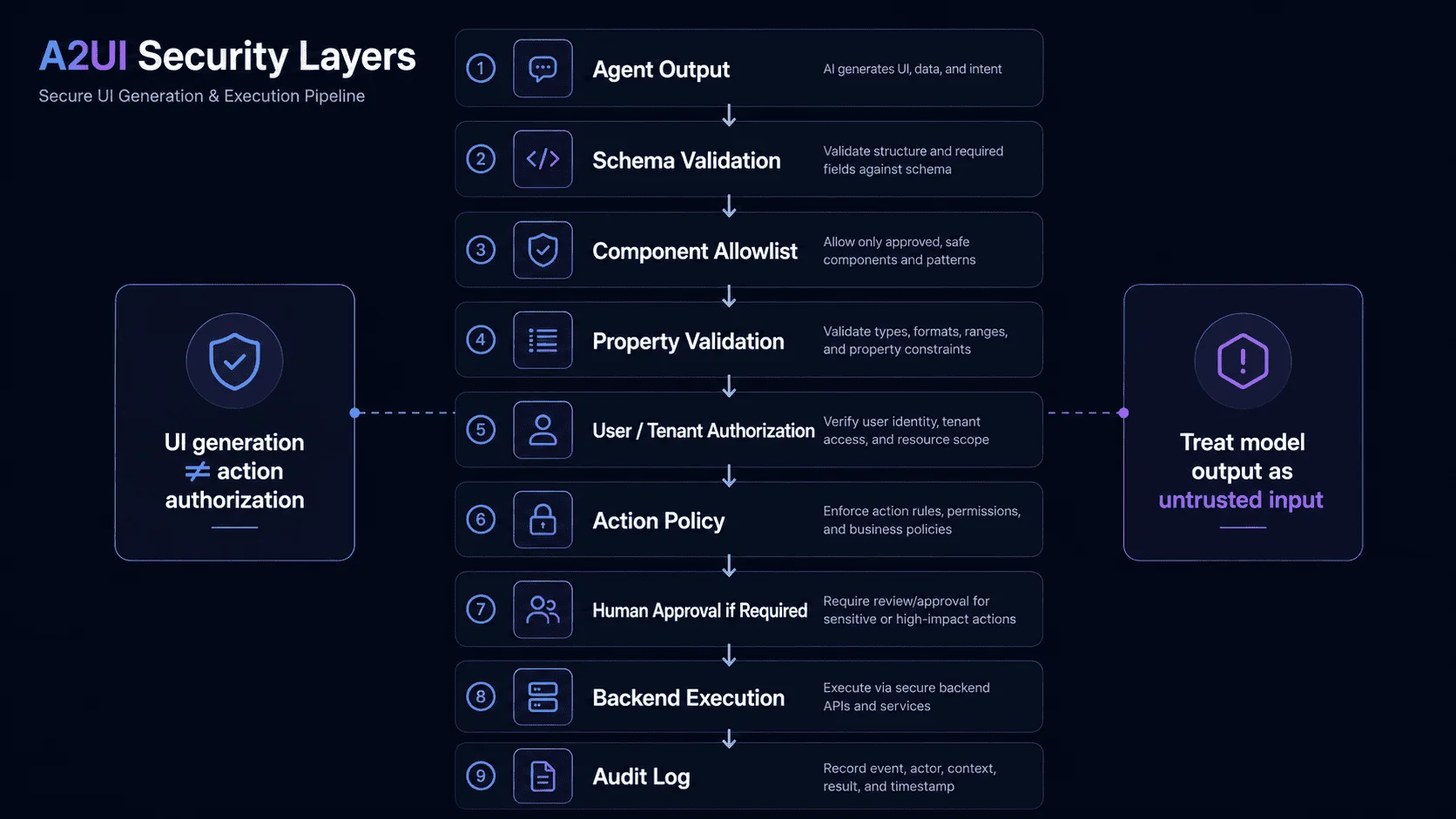
Allowing generated actions to bypass backend authorization
Rendering a control never grants permission.
Trusting model-generated properties
Validate every property.
Replacing core product navigation
Keep stable navigation predictable.
Ignoring accessibility
Generated composition must still preserve labels, focus order, keyboard support, screen-reader meaning, and contrast.
Ignoring mobile behavior
A desktop card grid may fail on a phone.
Allowing excessive layout changes during streaming
Protect user focus and entered data.
Depending on unstable protocol behavior without versioning
Pin and test supported protocol versions.
Building before validating the use case
A dynamic interface must produce a better user outcome, not simply look impressive.
Will Generative UI Replace Traditional Frontend Development?
No. It changes part of what frontend developers build. Traditional frontend engineering remains necessary for: Design systems, Component libraries, Accessibility, Navigation, Application architecture, State, Security boundaries, Mobile responsiveness, Performance, Testing, and Core deterministic workflows.
Generative UI adds a dynamic composition layer. Instead of manually designing every possible arrangement, developers can create trusted interface building blocks and allow an agent to select and combine them when appropriate.
This may actually make high-quality component systems more important. An AI can only compose reliable interfaces from the primitives and rules the application provides.
The Future of AI Applications Is Bigger Than a Chat Box
The first generation of AI applications proved that natural-language interaction can make software dramatically easier to use. The next generation will combine conversation with interfaces that adapt to the task.
Sometimes the best response will be text. Sometimes it will be: A chart, A comparison, A form, A project board, A document review panel, A configuration screen, A map, or An approval workflow.
A2UI represents one emerging approach to making those experiences portable and controlled. The important idea is larger than any one protocol: AI applications should be able to choose the interaction model that best helps the user complete the task.
Businesses evaluating generative UI should begin with one workflow where a dynamic interface produces an obvious improvement over chat. Build a controlled component catalog. Keep permissions in the backend. Validate generated structure. Measure whether users actually complete work faster. Then expand.
Related Guides
Ready to Build an AI Application That Goes Beyond Chat?
Build a modern AI web application, SaaS platform or agent experience with secure generative interfaces, business integrations and production-ready architecture.
Frequently Asked Questions
What is A2UI?
A2UI, or Agent-to-User Interface, is a declarative protocol for AI-agent-generated interfaces. An agent describes the interface it wants to present, while the client application renders that interface using approved components.
What is generative UI?
Generative UI is an application pattern in which an AI system dynamically determines or generates part of the interface according to user intent, context and data rather than relying exclusively on predetermined screens.
What is the difference between A2UI and a chatbot?
A chatbot primarily exchanges conversational messages. A2UI can allow an AI agent to return interactive forms, cards, controls, lists and other structured interfaces when those interactions are more appropriate than text.
Is A2UI the same as MCP?
No. MCP primarily standardizes access to tools and context, while A2UI focuses on declaratively describing interfaces. They can be used together.
What is the difference between A2UI and MCP Apps?
A2UI emphasizes declarative UI rendered through the host application's trusted component catalog. MCP Apps can deliver richer interactive web application experiences. Hybrid architectures can use both approaches.
Can A2UI work with React?
A2UI can be incorporated into modern web architectures through appropriate renderers and component mappings. Because support continues to evolve, developers should verify current renderer and protocol documentation before choosing a production implementation.
Is A2UI safe?
Its declarative architecture can reduce risks associated with executing arbitrary generated frontend code, but applications still need schema validation, component restrictions, safe rendering, server-side authorization, data isolation and security testing.
What A2UI version should I use?
As of August 10, 2026, A2UI lists v0.9.1 as its current production release and v1.0 as a release candidate. Verify the official documentation before implementation because the project is evolving.
Should every AI app use generative UI?
No. Generative UI is most useful when the ideal interface changes significantly according to context. Fixed interfaces remain better for many predictable workflows.
Can generative UI work on mobile?
A2UI is designed around platform-independent interface descriptions, with the client responsible for native rendering. Mobile renderer support continues to evolve.
How do I start building generative UI?
Start with one high-value workflow, define a small trusted component catalog, create deterministic test interfaces, connect the agent, validate every response, and test whether users achieve better outcomes.
References
- Google Developers — A2UI v0.9 and generative UI architecture
- Official A2UI project documentation/specification
- Official A2UI roadmap
- Google Developers — A2UI and MCP Apps
- Model Context Protocol — MCP Apps documentation
Related Guides

MCP and AI Integrations
Remote MCP Server for SaaS in 2026

AI Business Automation
AI Workflow Automation for Business

AI SaaS Development
How to Build an AI SaaS Product

AI Application Development